Tutorial: Creating a FastAPI Service Extension for Expected Parrot
1. Create Your FastAPI Service
Create a new file my_service.py with your complete service implementation:
from fastapi import FastAPI
from pydantic import BaseModel
from typing import Optional, Dict, Any, List

# Initialize FastAPI app
app = FastAPI(
    title="My Custom Service",
    description="A custom service for Expected Parrot",
    version="1.0.0"
)

# Define request/response models
class MyServiceRequest(BaseModel):
    # Define your input parameters
    param1: str
    param2: Optional[int] = 10
    ep_api_token: Optional[str] = None  # Include if your service needs the user's token

class MyServiceResponse(BaseModel):
    # Define your response structure
    result: Dict[str, Any]
    status: str

# Implement your service endpoints
@app.post("/process",
         response_model=MyServiceResponse,
         summary="Process data",
         description="Main endpoint for processing data")
async def process_data(request: MyServiceRequest):
    """
    Your main service logic goes here
    """
    try:
        # Your custom logic
        result = {
            "processed_param1": request.param1.upper(),
            "multiplied_param2": request.param2 * 2
        }

        # If using EDSL features with user's token
        if request.ep_api_token:
            # Example: Use EDSL with the user's token
            from edsl import Survey, QuestionFreeText

            q = QuestionFreeText(
                question_name="q1",
                question_text=f"What do you think about {request.param1}?"
            )
            survey = Survey(questions=[q])

            # Run survey with user's token
            results = survey.run(
                expected_parrot_api_key=request.ep_api_token,
                fresh=True
            )

            result["survey_results"] = results.to_dict()

        return MyServiceResponse(
            result=result,
            status="success"
        )

    except Exception as e:
        return MyServiceResponse(
            result={"error": str(e)},
            status="error"
        )

# Health check endpoint (recommended)
@app.get("/health")
async def health_check():
    return {"status": "healthy"}

# Run the service
if __name__ == "__main__":
    import uvicorn
    uvicorn.run(app, host="0.0.0.0", port=8003)  # Choose an available port
2. Register Your Service
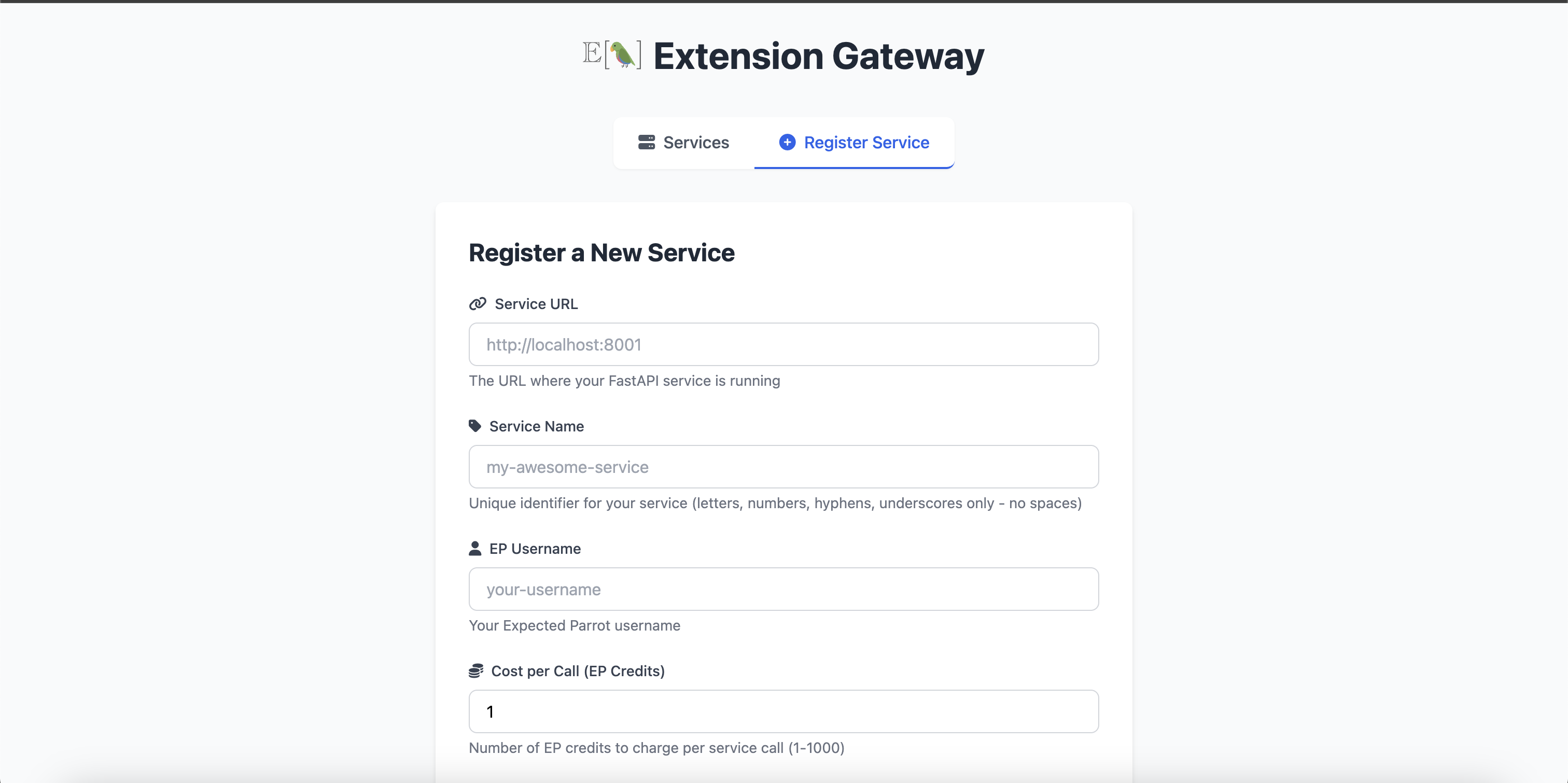
Once your service is running, navigate to the Extension Gateway register page and fill out the form as shown below:
3. Call Your Service from EDSL
Once your service is registered and running, users can call it from EDSL using the call_service function:
from edsl.extensions import call_service, list_services

# List all available services
services = list_services()
print("Available services:", services)

# Call your custom service
payload = {
    "param1": "hello world",
    "param2": 42
}

results = call_service(
    service_name="my-custom-service",
    path="process",
    method="POST",
    json_data=payload
)

print("Service results:", results)
Example: Text Analysis Service
Here's a more complete example service that performs text sentiment analysis:
from fastapi import FastAPI, HTTPException
from pydantic import BaseModel
from typing import List, Optional, Dict, Any
from edsl import Survey, QuestionMultipleChoice, Agent

app = FastAPI(
    title="Text Analysis Service",
    description="Analyzes text sentiment using EDSL agents",
    version="1.0.0"
)

class TextAnalysisRequest(BaseModel):
    texts: List[str]
    analysis_type: str = "sentiment"
    ep_api_token: Optional[str] = None

class TextAnalysisResponse(BaseModel):
    results: List[Dict[str, Any]]
    summary: Dict[str, Any]

@app.post("/analyze", response_model=TextAnalysisResponse)
async def analyze_texts(request: TextAnalysisRequest):
    if not request.ep_api_token:
        raise HTTPException(status_code=400, detail="API token required")

    results = []

    for text in request.texts:
        q = QuestionMultipleChoice(
            question_name="sentiment",
            question_text=f"What is the sentiment of this text: '{text}'",
            question_options=["Positive", "Negative", "Neutral"]
        )

        survey = Survey(questions=[q])
        agent = Agent(traits={"role": "expert text analyst"})

        result = survey.by(agent).run(
            expected_parrot_api_key=request.ep_api_token,
            fresh=True
        )

        results.append({
            "text": text,
            "sentiment": result.select("sentiment").first()
        })

    # Create summary
    sentiments = [r["sentiment"] for r in results]
    summary = {
        "positive": sentiments.count("Positive"),
        "negative": sentiments.count("Negative"),
        "neutral": sentiments.count("Neutral")
    }

    return TextAnalysisResponse(results=results, summary=summary)

@app.get("/health")
async def health_check():
    return {"status": "healthy", "service": "text-analysis"}

if __name__ == "__main__":
    import uvicorn
    uvicorn.run(app, host="0.0.0.0", port=8004)
To call this service from EDSL:
from edsl.extensions import call_service

payload = {
    "texts": ["I love this product!", "This is terrible", "It's okay I guess"],
    "analysis_type": "sentiment"
}

results = call_service(
    service_name="text-analysis-service",
    path="analyze",
    method="POST",
    json_data=payload
)

print(results)
Best Practices
- Always Include OpenAPI: FastAPI automatically generates
/openapi.json- the gateway uses this - Health Endpoint: Include a
/healthendpoint for monitoring - Error Handling: Return proper HTTP status codes and error messages
- Token Handling: Only request
ep_api_tokenif your service needs it - Documentation: Use FastAPI's built-in documentation features (summary, description)
- Example Scripts: Provide clear example scripts when registering
- Validation: Validate inputs using Pydantic models
- Credit Costs: Set appropriate credit costs based on computational complexity
Service Configuration Options
When registering your service:
- service_name: Unique identifier (no spaces, 3-50 chars)
- service_url: URL where your service is running
- description: Clear description of what your service does
- cost_credits: Credits charged per call (≥ 0)
- uses_user_account: Whether service needs user's EP token
- example_script: Example code showing how to use your service